
This post will be a brief road-map for those who want to serve the built files of an Angular repository in github-pages instead of serving repo’s README.md files.
What is GitHub Pages?
GitHub by default uses the README.md file inside the root of the repository as the repository’s docs page. If you want to change this and serve the distribution files of your repository, you need to enable a feature called GitHub Pages inside your repo’s settings. GitHub Pages concept stands for serving a client application built from the content you provide.
How to Use GitHub Pages?
When you get to your repository’s Settings Page, you will see there are 2 options to provide your content for GitHub pages to be built from:
- Use the docs folder inside the repository
- Use the master branch to serve the application
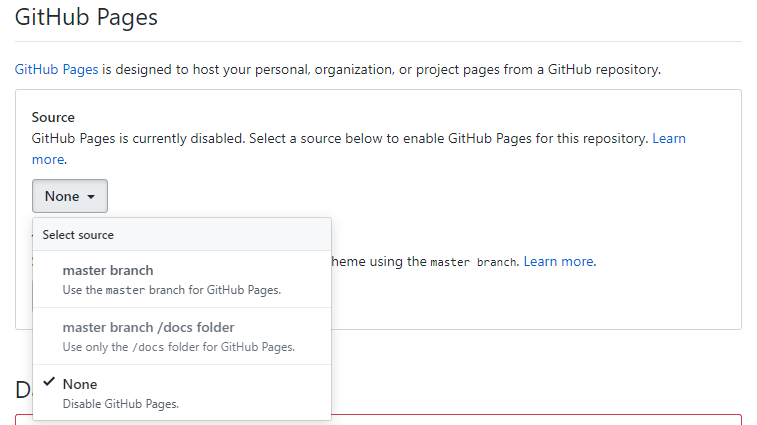
However there is one more option, if you create a branch called gh-pages, it will also be listed as a source inside the selection box shown above.
The main idea is providing the GitHub pages content in either of these 3 ways. You can simply use your git client (any git client, can be with GUI; GitKraken, Github etc.) and push your built Angular application into those directories.
Step-by-Step Guide Using master/docs folder
1. Update Angular.json File
Line 8: We need your repository’s built distrubution files to be inside docs folder. That’s why we will update the application’s output path inside angular.json file
"projects": {
"mat-table-extensions": {
  "projectType": "application",
  ...
  "architect": {
	"build": {
	  "options": {
		"outputPath": "docs",
		...
	  },
	  "configurations": {
		"production": {
		  "baseHref": "/mat-table-extensions/",
Line 13: Your application’s baseHref should be the same with your repository name. You can also give base-href parameter when building.
2. Select master/docs for gh-pages
Go to your repository’s settings page. Under GitHub Pages title select master branch/docs folder option.
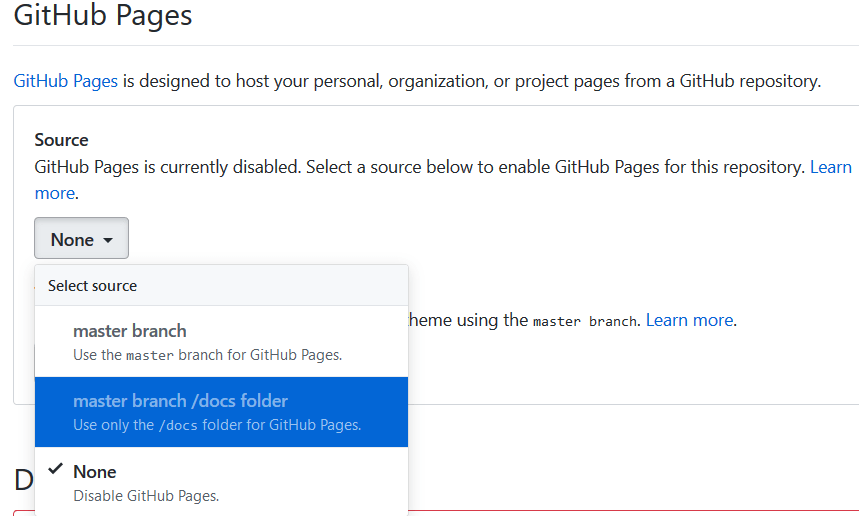
That’s all. If you want your GitHub Pages site to be always up-to-date, make sure you get a build before pushing your changes to the repository.
Keywords: Deploying Your Angular Application to Github Pages
 talhature.com